
Local HUD
Install StakeOut Pro in your browser
Five minutes, once. After that, updates install themselves. Nothing to buy on this site: the free trial and the licence are taken right inside the HUD.
-
1
Install Tampermonkey
It's the extension that runs the script. Pick the one for your browser:
Click Add to Chrome, then pin the Tampermonkey icon next to the address bar: puzzle icon, then pin.
-
2
Allow user scripts
Right-click the pinned Tampermonkey icon, then Manage extension. Turn on Developer mode, top right:
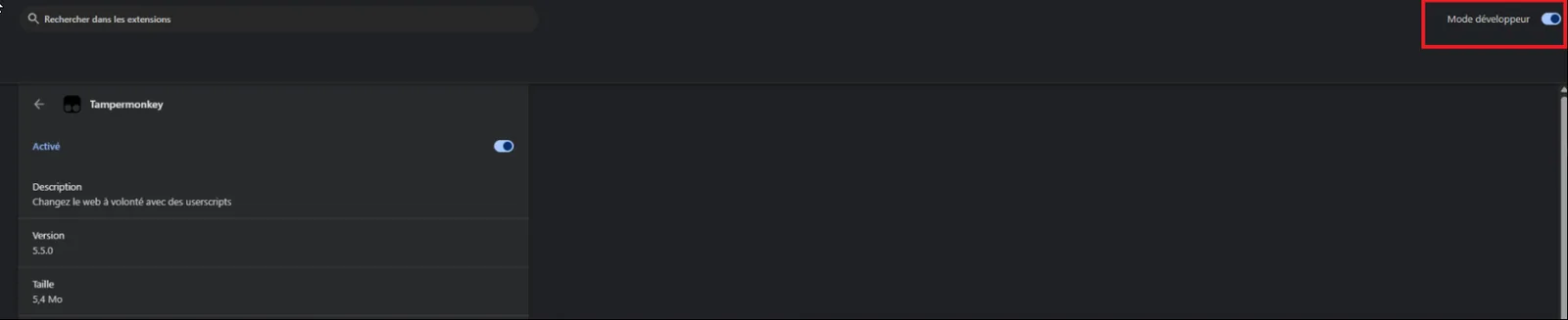
On the same page, turn on Allow User Scripts:

Without these two settings, Tampermonkey runs no script at all. On Firefox there's nothing to do.
-
3
Install the script
Click the button: Tampermonkey opens its page, click Install.
Install StakeOut ProUpdates are automatic: when a version is out, an orange banner in the HUD asks you to reload the page.
-
4
Start it on Stake
Logged in to your account, open any Stake page (or your mirror: stake.games, stake.bet…). StakeOut Pro shows up.
- Step 1: click Verify my Stake account, it takes a few seconds.
- Step 2: take the 3-day free trial, a plan, or enter your licence key (HUD or Cloud Claimer).
Keep a Stake tab open: the HUD's claimer runs as long as there is one.
-
5
Link your licence on Discord
On our Discord, licence channel, click Link my licence and enter your Stake username and key (private form). You get the Licence active role, which unlocks news, giveaways and the beta.
discord.gg/3ZK3e2PFbG
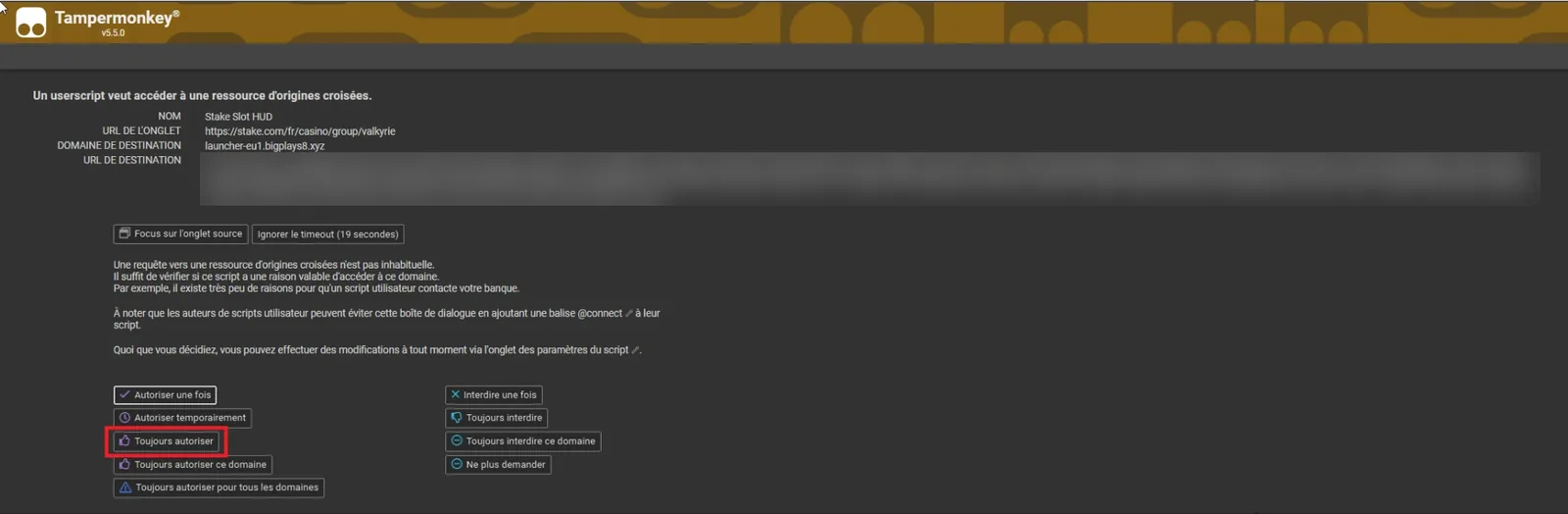
The first time you open a slot provider
Tampermonkey asks for permission. Pick Always allow (circled in red) to approve it for good. Same answer if it asks again for another provider.
The HUD licence, right inside the HUD
No payment on this site for the HUD: at step 2, pick your plan and pay in crypto without leaving Stake.
- Trial3 days free
- 8 $7 days
- 29 $1 month + 1 Hacksaw hoodie
- 75 $3 months + 1 Hacksaw hoodie
Got a Cloud Claimer key?
Your offline claimer licence also unlocks the HUD: enter it at step 2. You get slots, Originals, live casino and sports. Code claiming, reloads and Paperclip tickets stay off in the HUD, because our servers already do them for you.
See the full comparisonIf something goes wrong
- Nothing shows up on Stake
- Check step 2: Developer mode and Allow User Scripts must be on, then reload the Stake page.
- "Licence used on another device"
- One licence = one browser at a time. Close the HUD on the other computer or browser, then activate your key again.
- Still stuck?
- Open a ticket in the support channel of the Discord. Never paste your key in a public channel.